Image Optimization
The objective of image compression (optimization) is to reduce irrelevance and redundancy of image data in order to be able to store or transmit data in an efficient form. Proper use of image compression can make a huge difference in the appearance and size of your website image files.
Interactive Compression Comparison
Drag the slider left and right to inspect Lossless vs Lossy compression quality artifacts.


“Lossless” vs. “Lossy” Compression
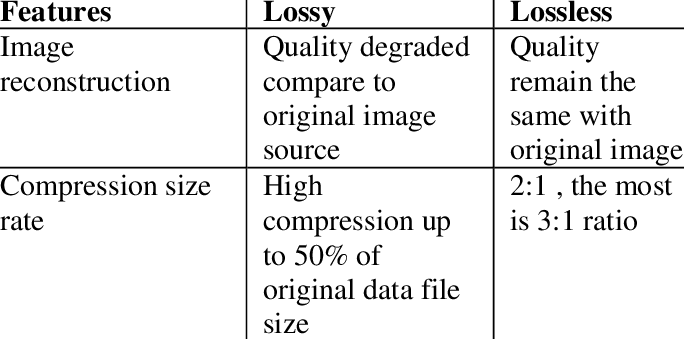
Many people feel that they should only use image formats that use lossless compression. While lossless compression is superior for many kinds of images, it’s not necessary for many others. Lossless image compression means all the data from the original file is preserved. Lossy compression, on the other hand, removes some data from the original file and saves the image with a reduced file size. It’s up to you, as the designer, to tell it how much data to disregard by setting the image compression rate.
Lossy Compression
There are a number of lossy compression methods, many of which can be combined with lossless methods to create even smaller file sizes.
1. One method is reducing the image’s color space to the most common colors within the image. This is often used in GIF and sometimes in PNG images to result in smaller file sizes.
(Special Note: When used on the right types of images and combined with dithering, it can result in images nearly identical to the originals.)
2. Transform encoding is the type of encoding used for JPEG images. In images, transform coding averages out the color in small blocks of the image using a discrete cosine transform (DCT) to create an image that has far fewer colors than the original.
3. Chroma subsampling is another type of lossy compression that takes into account that the human eye perceives changes in brightness more sharply than changes of color, and takes advantage of it by dropping or averaging some chroma (color) information while maintaining luma (brightness) information. Commonly used in video encoding and JPEGs.
Lossless Compression
There are a few different methods for lossless compression.
1. There’s run-length encoding (used for BMP files), which takes runs of data (consecutive data elements with identical values) and stores them in a single data value and count. It’s best suited for simple graphics files.
2. DEFLATE is another lossless data compression method used for PNG images using a combination of the LZ77 algorithm and Huffman coding. (Also used in ZIP compression).
3. Lempel-Ziv-Welch (LZW) compression is a lossless compression algorithm that performs a limited analysis of data (used in GIF and some TIFF formats).
GIF (Graphics Interchange Format)
GIF is a bitmap image format introduced in 1987. It supports up to 8 bits per pixel, meaning an image can have up to 256 distinct RGB colors.
PNG (Portable Network Graphics)
A bitmapped format using lossless compression to replace GIFs. Supports palette-based color (24-bit RGB or 32-bit RGBA), greyscale, and crucially supports alpha channel transparency.
JPG (Joint Photographic Experts Group)
Uses lossy compression for smaller file sizes, allowing designers to fine-tune compression levels. Prone to “artifacting” (pixelization and halos) in high-contrast border areas.
Choosing a File Format
Choosing the proper file format for your image will result in higher quality images and smaller file sizes.
1. GIF — Line drawings & simple graphics. Best for logos or simple line art without subtle color gradients or complex transitions.
2. JPG — Photos without high contrast. Great for photos and subtle color shifts where sharp borders are absent.
3. PNG — Line art, illustrations, & transparency. Ideal for high contrast images, screenshots, diagrams, and partial transparency requirements.